
Firmware Version Requirements
Important: It is mandatory to apply the Firmware Upgrade procedure prior to using this version of the driver.
Note: The Coaxlink driver checks the compatibility of the firmware installed on every Coaxlink card. For Coaxlink cards having an incompatible firmware, the GenTL driver exposes 0 (zero) Device and the GenICam browser displays a "Firmware too old" error message:
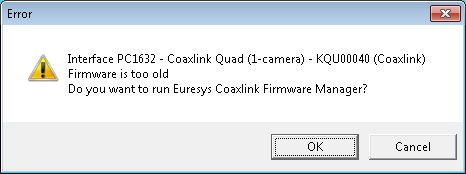
"Firmware too old" error message
 Coaxlink 10.3
| Product/Firmware Variant Combinations | Min. Firmware Version Number |
|---|---|
| All product/firmware variant combinations | 258 |
Previous Releases
Coaxlink 10.2
| Product/Firmware Variant Combinations | Min. Firmware Version Number |
|---|---|
| All product/firmware variant combinations | 251 |
Coaxlink 10.1.2
| Product/Firmware Variant Combinations | Min. Firmware Version Number |
|---|---|
|
|
248 |
|
|
|
|
|
|
|
|
|
|
|
|
|
|
246 |
| Other product/firmware variant combinations | 245 |
Coaxlink 10.0
| Product/Firmware Variant Combinations | Min. Firmware Version Number |
|---|---|
| All product/firmware variant combinations | 240 |
Coaxlink 9.5
| Product/Firmware Variant Combinations | Min. Firmware Version Number |
|---|---|
| All product/firmware variant combinations | 232 |
Coaxlink 9.4
| Product/Firmware Variant Combinations | Min. Firmware Version Number |
|---|---|
| All product/firmware variant combinations | 229 |
Coaxlink 9.3
| Product/Firmware Variant Combinations | Min. Firmware Version Number |
|---|---|
| All product/firmware variant combinations | 228 |
Coaxlink 9.2
| Product/Firmware Variant Combinations | Min. Firmware Version Number |
|---|---|
| All product/firmware variant combinations | 226 |
Coaxlink 9.1
| Product/Firmware Variant Combinations | Min. Firmware Version Number |
|---|---|
| All product/firmware variant combinations | 224 |
Coaxlink 9.0
| Product/Firmware Variant Combinations | Min. Firmware Version Number |
|---|---|
|
|
222 |
|
|
221 |
|
|
219 |
| Other product/firmware variant combinations | 217 |