EasyColor makes color image processing as efficient as possible by detecting, classifying and analyzing objects. 几个转换函数意味着可以处理任何颜色系统。
 颜色定义和支持的系统
什么是颜色?
| ● | 人眼对光敏感: |
| □ | 强度或无色感觉,由灰度图像捕获。 |
| □ | 波长或色彩感觉,以红色、绿色和蓝色原色描述。 真彩色数字图像(每像素 24 位;每个 RGB 通道 8 位)表示与眼睛可以区分的颜色一样多的颜色。 |
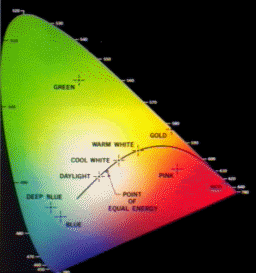
在 XYZ 色彩空间的可见色域
| ● | 有三种颜色系统: |
| □ | Mixture systems (RGB / XYZ) give the proportions of the three primaries to be combined. |
| □ | YUV Luma/chroma systems (YUV / L*a*b* / L*u*v* / YCbCr) separate the achromatic (Y) and chromatic sensations (U & V). 当也需要黑白图像(电视)时使用。 |
| □ | Intensity/saturation/hue systems (ISH / LSH / VSH / LCH / YSH) separate achromatic (black and white Intensity) from enhanced chromatic (color Saturation and Hue) sensations. 用于消除照明效果,或将 RGB 图像转换为其他颜色系统。更饱和的颜色更加生动,饱和欠缺的颜色更加暗淡。 |
| ● | 一般来说: |
| □ | 显示器、相机和其他显示设备使用 RGB。 |
| □ | YUV / YCbCr is used for efficient transmission of color images by compressing the chrominance information. |
| □ | XYZ 用于与设备无关的颜色表示。 |
| ● | 所有图像处理操作都可以使用量化的坐标:[0..255] 隔中的离散值,它使用字节表示将图像存储在帧缓冲区中。 |
| ● | 彩色系统转换操作也可以使用更简单的未量化坐标:连续值,通常规范化为 [0..1] 隔。 |
彩色图像处理
| ● | 彩色图像是每像素三个分量的矢量场。由物体反射的所有三个 RGB 分量都具有与光源强度成比例的幅度。通过考虑两种颜色分量的比例,可获得照明无关图像。通过巧妙地组合每个像素的三条信息,可以提取更好的功能。 |
| ● | 有 3 种处理彩色图像的方法: |
| □ | 分量提取:您可以从三色信息中提取最相关的功能,以减少数据量。例如,可以通过其色调来区分对象,预处理步骤可以将图像转换为仅包含色相值的灰度图像。 |
| □ | 去耦合变换:您可以对每个颜色分量分别执行操作。例如,将两个图像添加到一起,添加红色、绿色和蓝色分量,并将结果按分量逐个存储在生成的彩色图像中。 |
| □ | 耦合变换:您可以组合所有三个颜色分量来生成三个派生分量。例如,将 YIQ 转换为 RGB。 |
支持的颜色系统
| ● | EasyColor supports color systems RGB, XYZ, L*a*b*, L*u*v*, YUV, YCbCr, YIQ, LCH, ISH / LSH, VSH and YSH. |
| ● | RGB 是与 24 位 Windows 位图兼容的首选内部表示形式。 |
|
|
基于 RGB |
基于 XYZ |
基于 YUV |
|---|---|---|---|
|
混合 |
— |
||
|
明亮度/色度 |
— |
||
|
强度/饱和度/色调 |
Transform using LUTs (Lookup Tables)
| ● | EasyColor Lookup Tables provide an array of values that define what output corresponds to a given input, so an image can be changed by a user-defined transformation. |
| ● | 彩色像素可以占用 16,777,216(224)个值,具有这些条目的全色 LUT 将占用 50MB 的存储器,并且变换将非常耗时。预先计算的 LUT 使颜色变换成为可行。 |
| ● | 要转换彩色图像,请使用以下函数之一初始化彩色 LUT: |
| □ | LUT for Gain / Offset (Color): EasyImage.GainOffset, |
| □ | 用于色彩校正的 LUT: EColorLookup.Calibrate, |
| □ | 用于色彩平衡的 LUT: EColorLookup.WhiteBalance, |
| □ | EColorLookup.ConvertFromRGB, EColorLookup.ConvertToRGB. |
| ● | This color LUT is then used in a transform operation such as EasyColor.Transform or you can create a custom transform using EColorLookup which takes unquantized values (continuous, normalized to [0..1] intervals), and specifies the source and destination color systems. 一些运算在运行中使用 LUT,因此避免存储变换后的图像,例如,在图像为 RGB 格式的情况下改变 U(YUV 之一)分量。 |
| ● | 精度和速度的最佳组合由和的选择确定 - 变换值的精度大致对应于索引位数。 |
| □ | 更少的表条目意味着较小的存储要求,但精度较低。 |
| □ | 无需进行插补运算,运行时间更短,精度更低。插值可以恢复每个分量 8 位的精度。当所涉及的变换是线性的(例如从 YUV 到 RGB)时,无论表条目的数量如何,插值总是给出精确的结果。 |
|
索引位 |
条目数量 |
表大小(字节) |
|
|---|---|---|---|
|
4 |
2(3*4) = 4,096 |
14,739 |
|
|
5 |
2(3*5) = 32,768 |
107,811 |
|
|
6 |
2(3*6) = 262,144 |
823,875 |
合并、提取和着色
| ● | 彩色图像包含连续色调图像的三个颜色平面。 |
| ● | 灰度图像可以是彩色系统的组成之一。 |
合并和提取分量
| ● | EasyColor can change or extract one plane at a time, or all three together. 参见、、、。 |
| ● | 这些操作可以使用颜色 LUT 进行即时变换,它们可以从亮度、饱和度和色调平面构建 RGB 图像。 |
EasyColor functions perform the necessary interleaving / un-interleaving operations to support Windows bitmap format of interleaved color planes (blue, green and red pixels follow each other).
伪灰色将灰度图像转换为彩色
| ● | 诀窍是定义 256 色的常规色域,并将每种颜色分配给具有相应灰度值的像素。 |
| ● | 要定义伪色调,您可以在任意系统的颜色空间中指定轨迹。然后,您可以使用绘图函数调色板(参见图像和矢量绘图)进行伪色处理,然后像其他任何彩色图像一样保存和/或转换它。 |
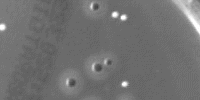
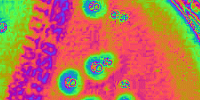
灰度级和伪色图像
单独的颜色对象
| ● | This EasyColor process takes a set of distinct colors and associates each pixel with the closest color, using a layer index that can then be used in EasyObject with the labeled image segmenter to improve blob creation. |
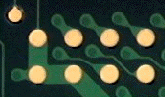

原始图像和分割图像(3 种颜色)
RGB(A) to/from BGR(A) conversion
| ● | EasyColor allows to convert an EImageC24 to/from RGB and an EImageC24A to/from RGBA both in-place or in another image. |
| □ | Internally, Open eVision uses BGR(A) images. |
This is useful if the color image provided to Open eVision is in RGB(A) format or if an image processed by Open eVision is required in RGB(A) format.