Managing the Dataset Splits
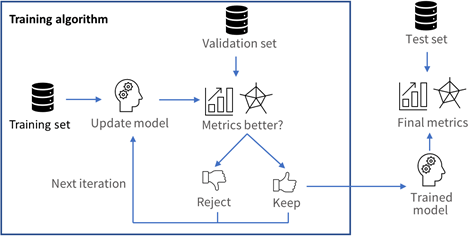
It is important to split the dataset into 3 sets:
|
□
|
The training set contains the images that are used during training to update and optimize the deep learning model. |
|
□
|
The validation set contains the images that are used during training to select the model that gives the best performance. |
|
□
|
The test set contains images that are not used during training and that are used to evaluate the final performance of your classifier. |
The following picture shows how and when each set is used.
These sets MAY NOT contain:
- Images of the other sets.
- Images of an object for which there are other images in other sets.
为什么它很重要?
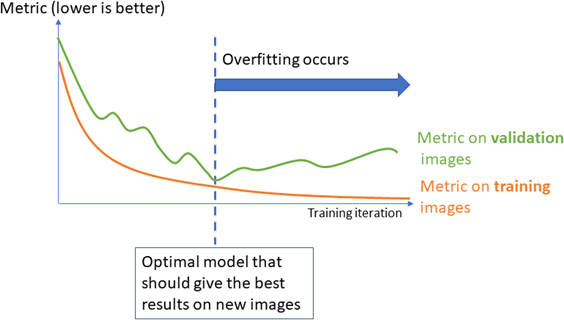
Deep learning techniques can suffer from overfitting; this means that the trained classifier is too focused on the specific images present in the training set and it is not able to learn a general model of your data. For example, an overfitted model can learn to recognize the exact images present in the training set and not the underlying defects that you want to detect. 这种工具在生产中表现不佳。
The validation set is used during training to prevent and know when overfitting occurs. This keeps the tool in a state that gives the best performance on the validation set. Without the validation set, it is impossible to know if a tool that performs well on its training set can also perform well in production.
Thus, a tool that gives high performance on the training set but much lower performance on the validation set has overfitted.
The training algorithm is designed to avoid overfitting by keeping the model at the iteration that gives the highest performance on the validation set.
To minimize overfitting and increase the performances:
|
□
|
You can add more images to your dataset. |
数据增强生成训练数据集中的图像的随机变换,以使工具具有强健性来执行原始训练数据集中不存在的几何、亮度或噪声差异。
Splitting the dataset in Deep Learning Studio
In Deep Learning Studio, open the Dataset split tab:
|
1.
|
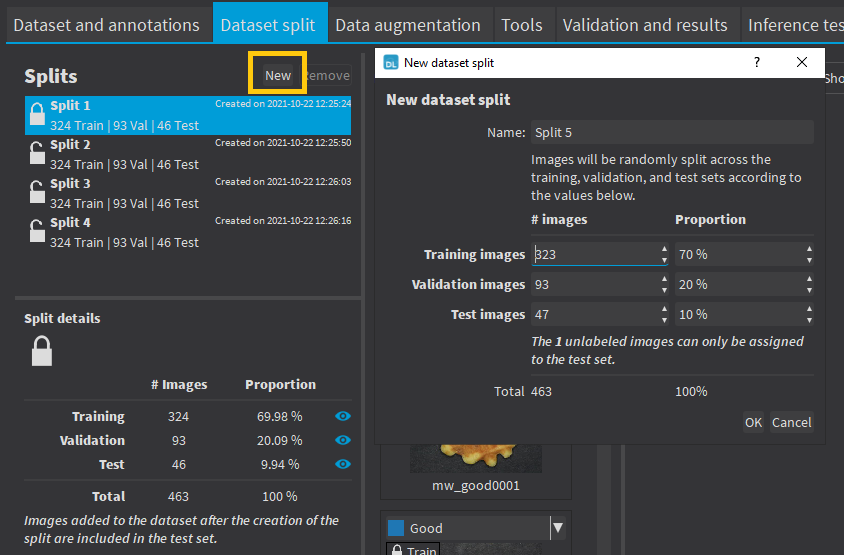
To create new dataset splits, click on New. |
|
□
|
A new split is created randomly according to the specified proportion or number of images. |
|
□
|
The default proportion of images is 70% of training images, 20% of validation images and 10% of test images. |
|
□
|
Images without a proper annotation must be in the test set. |
|
2.
|
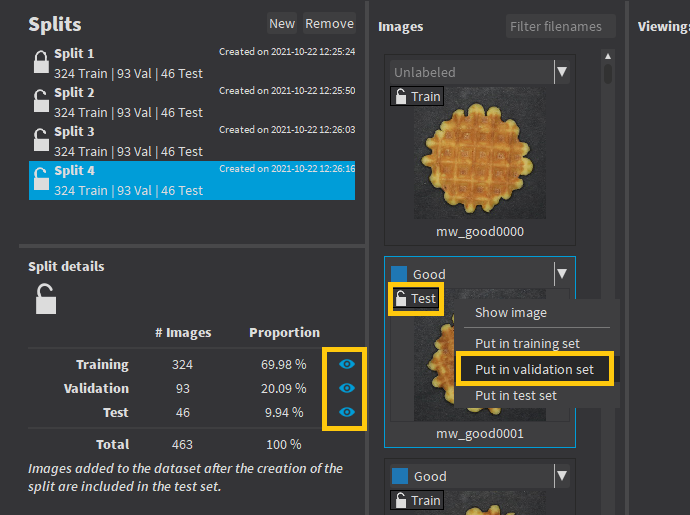
The dataset splits can be locked  or unlocked or unlocked  . A dataset split is locked when it was used to train a tool. When a dataset split is locked: . A dataset split is locked when it was used to train a tool. When a dataset split is locked: |
|
□
|
You cannot move images out of the training or validation sets. |
|
□
|
You can only move images from the test set to either the training set or the validation set. |
|
4.
|
Double-click on a split to change its name. |
Images added to the dataset after you have created a split are automatically assigned to the test set of that split.
We recommend to experiment with several different splits to see how the training behaves with different training sets.
Splitting the dataset in the API
 or
or  to filter the image list according to the set type.