Object Template Matcher
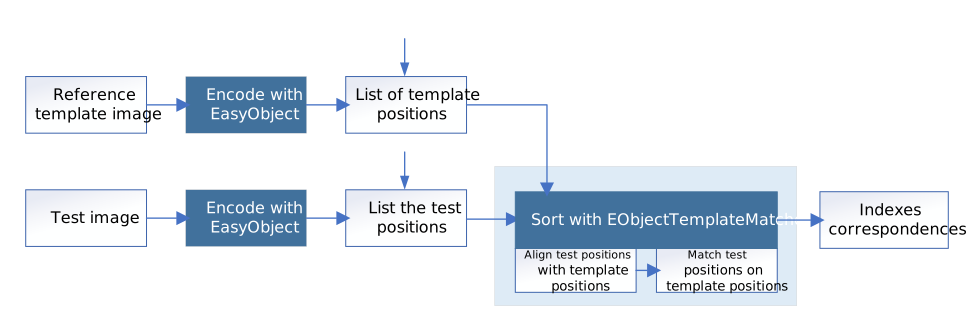
The class EObjectTemplateMatcher is a tool designed to align and match the output of EasyObject to a reference template. It is designed and developed to handle efficiently thousand of objects.
Creating the reference template
Use the method BuildTemplate to create the reference template, with one of the following parameters:
|
□
|
A list of positions, given by a vector of points (std::vector<EPoint>). |

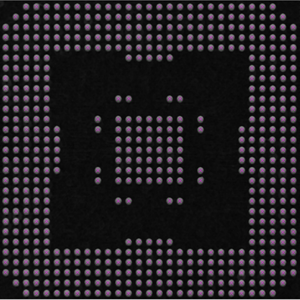
An encoding of the reference image for use as the template.
And the center positions of each object for use in the matching process.
Sorting the objects
|
●
|
To perform the matching after setting up the template: |
|
□
|
Or use the more generic method SortPositions with a std::vector<EPoint> as parameter. |
|
●
|
When you pass the objects in a selection as the sort method parameter, the bounding box center of the objects is the position used for the matching with the template. |
|
●
|
Before the sorting, EObjectTemplateMatcher performs an optional global rigid alignment of the submitted positions with the defined template. |
|
□
|
This alignment only applies the translation and rotation transformations. |
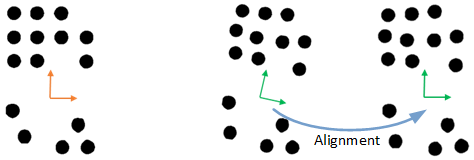
Left: the template.
Right: the alignment of the submitted selection.
|
●
|
After the optional alignment, EObjectTemplateMatcher matches the submitted positions with the reference template. |
|
□
|
It uses the shortest distance criterion to pair these positions with the template. |
|
□
|
You can set the maximum distance to constraint the search. This can speed up the processing. |
Retrieving the Sorting Results
|
●
|
Use one of these methods to retrieve the sorting results: |
|
□
|
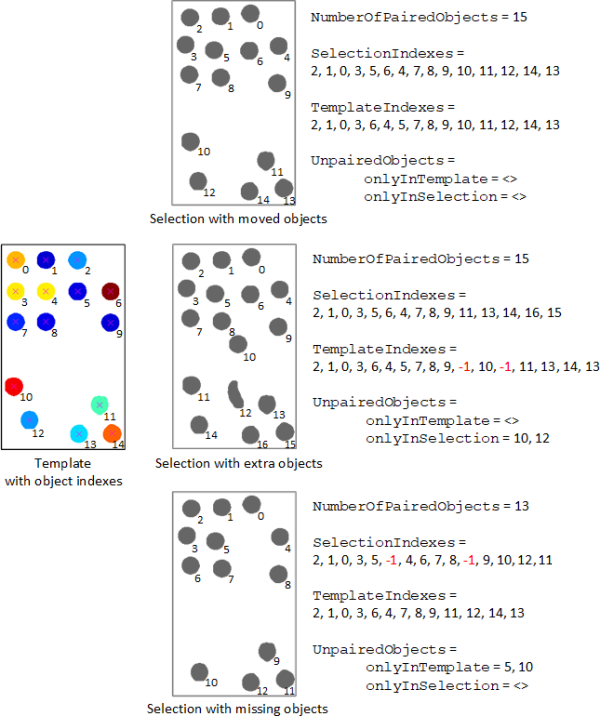
SelectionIndexes returns, for each position in the template, the paired index in the selection. The value -1 is used if the object in the template has no correspondence in the selection. |
|
□
|
TemplateIndexes returns, for each position in the selection, the paired index in the template. The value -1 is used if the object in the selection has no correspondence in the template. |
|
□
|
GetUnpairedObjects returns the positions in the template and in the selection that have not been paired. |