


Euresys GenApi Extensions
The Euresys GenApi module provides useful extensions exposed as virtual GenApi features accessible with two different syntaxes:
| ● | @-commands: @-prefixed features, e.g. @help |
| ● | properties: .<property>-suffixed features, e.g. Width.Max |
Those virtual GenApi features are only available in modules opened with the Euresys GenApi implementation. They extend the set of features exposed by the camera description file (a.k.a. the “XML” file).
Those extensions are useful in applications to build advanced queries on remote device (or GenTL module) features or to configure the behavior of the Euresys GenApi implementation. The following sections document the available commands and properties.
Learn and experiment
The command-line gentl tool provides an environment to experiment with and learn about the Euresys @-commands. This environment is available with the tool mode genapi.
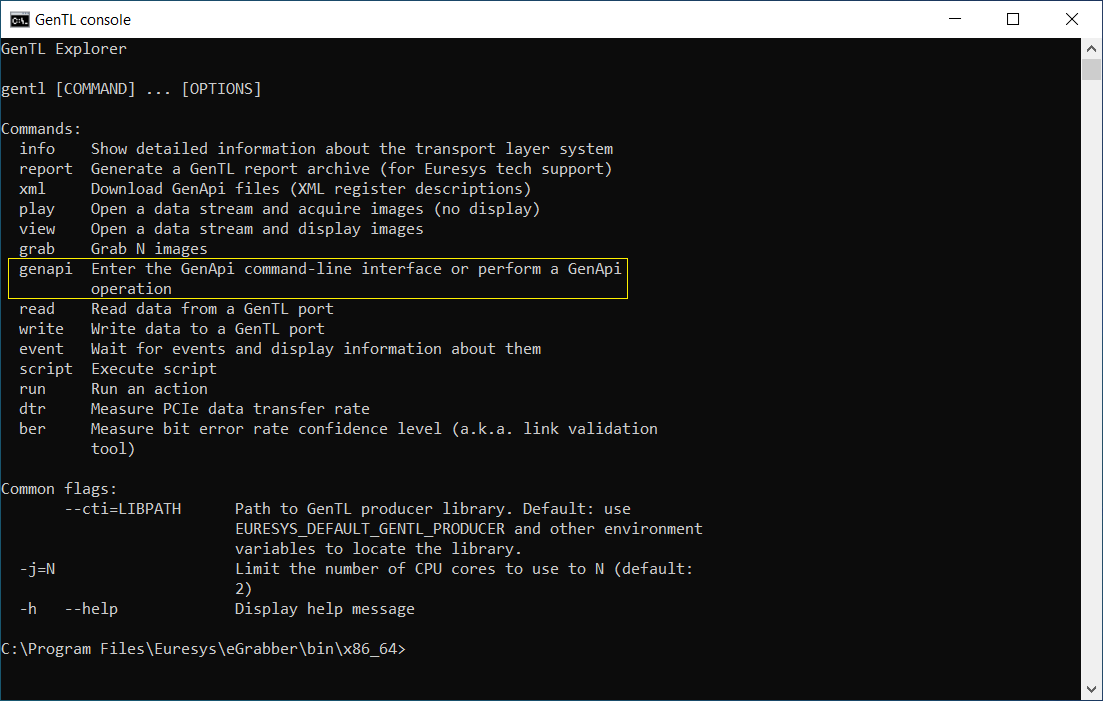
You can quickly enter the mode by executing gentl genapi at the command prompt; this will open the remote device associated to the first GenTL device of the first GenTL interface of the default GenTL producer.
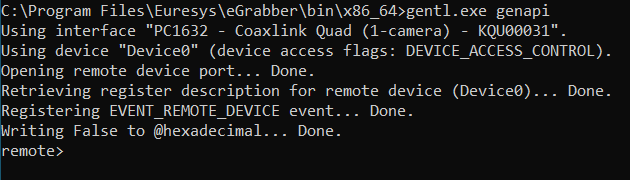
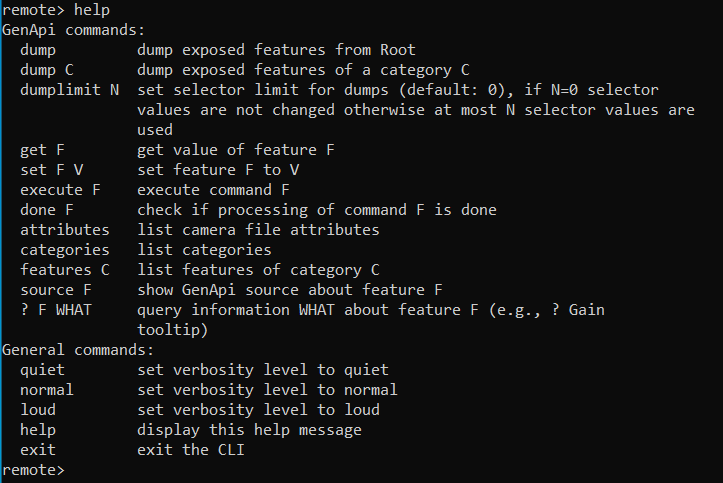
The environment is now waiting for user commands to execute. You can obtain some help by entering the command help:
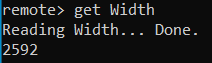
Let’s focus on the command get, which gets the value of a given feature. For example, to query the remote device feature Width, we can issue the command get Width:
| NOTE: | Please note this environment offers other useful commands (set, dump, source…); we encourage you to take some time to discover and experiment them as they are useful when troubleshooting camera setup or when prototyping some queries/commands that will ultimately be coded in an eGrabber-based application. |
The gentl genapi command prompt can auto-complete or show completion options of feature names when pressing the Tab key. For example, it’s possible to type get Wid and press the Tab key… either there is no other feature starting with Wid and the full feature name Width is completed, or the available options are printed to the console. (The completion only applies to GenApi features, so the name of GenApi nodes which don’t belong to categories referenced from the Root category are not auto-completed.)
Euresys GenApi @-commands
The Euresys GenApi environment provides a description of the available @-commands with the virtual feature @help. As most @-commands, this virtual feature implements the GenApi IString interface therefore it acts a GenApi string feature and its value can be queried from the gentl genapi command prompt by running the command get @help:
remote> get @help
Special @-commands:
  @xml                      current GenApi XML file
  @attributes               list attributes of GenApi document
  @features [C]             list features [of category C]
  @!features [C]            list available features [of category C]
  @categories [C]           list categories [of category C]
  @!categories [C]          list available categories [of category C]
  @ee E                     list enum entries of enumeration E
  @!ee E                    list available enum entries of enumeration E
  @interfaces F             list interfaces of F
  @selected F               list nodes selected by F
  @selectors F              list selectors of F
  @eventnodes ID            list nodes with specified eventID
  @available F [EE]         'True' if F [or enum entry EE of F] is available, 'False' otherwise
  @readable F               'True' if F is readable, 'False' otherwise
  @writeable F              'True' if F is writeable, 'False' otherwise
  @implemented F            'True' if F is implemented, 'False' otherwise
  @command F                'True' if F is a command, 'False' otherwise
  @done F                   'True' if the command F is done, 'False' otherwise
  @source F                 the XML source of F
  @info F WHAT              information WHAT about F
  @eeinfo F E WHAT          information WHAT about entry E of F
  @config                   current config values
  @declare(integer) NAME    declare a virtual user feature of type Integer
  @declare(float) NAME      declare a virtual user feature of type Float
  @declare(string) NAME     declare a virtual user feature of type String
  @undeclare NAME           undeclare (delete) a virtual user feature
  @declared                 list virtual user features
  @poll                     invalidate and report features with expired polling time
  @pollable                 list features with a defined polling time
  @show F...                show features
  @help [TOPIC]             this general help text or a TOPIC specifc help

Additional help topics: properties, bootstrap, fileaccess

Filtering results of @features and @ee commands:
  =~ RE      only keep results matching (PERL) regular expression RE
  =? GLOB    only keep results matching glob pattern GLOB
Glob patterns only match whole-words. When using regular expression patterns,
use the caret (^) and dollar ($) symbols to match whole-words.

Examples:
  @features
  @features =? Pay[Ll]oadSize
  @features =~ ^(CxpLinkConfiguration|LinkConfig)$
  @ee PixelFormat
  @ee TriggerSource =? CXP*
  @ee PixelFormat =~ Mono.*
Below are a few concrete examples you can try in the gentl genapi
command prompt.
Checking availability
remote> get @available PixelFormat
True
remote> get @available PixelFormat Mono8
True
The first command checks whether the feature PixelFormat is
available (i.e. whether it’s readable and/or writable) while the second
command checks whether the entry Mono8 of the enumeration
PixelFormat is available.
Getting XML code
The complete XML document associated with the current GenApi context can be
obtained by getting the virtual feature @xml and the XML
snippet of a specific GenApi node or feature can be obtained with the
virtual feature
@source:
remote> get @source DeviceModelName
<StringReg Name="DeviceModelName" NameSpace="Standard"><ToolTip>Device Model Name</ToolTip><Description>Device Model Name.</Description><DisplayName>Device Model Name</DisplayName><Address>0x2020</Address><Length>32</Length><AccessMode>RO</AccessMode><pPort>Device</pPort></StringReg>
GenApi module configuration
The GenApi module configuration can be displayed with the command get @config:
remote> get @config
@hexadecimal = False (bool)
@rollbackSelectors = True (bool)
@portCache = True (bool)
@checkRange = True (bool)
@checkRangeOnRead = False (bool)
@useRepresentation = True (bool)
@setTLParamsLocked = True (bool)
@checkFloatToIntOverflow = True (bool)
@checkError = True (bool)
Each configuration option can be individually read or modified.
| Configuration name | Configuration description | Default value |
|---|---|---|
| hexadecimal | default integer representation (1)(5) | False
|
| rollbackSelectors | set selector values back to original value (2) | True
|
| portCache | enable/disable the cache of registers (3) | True
|
| checkRange | enable/disable number range checking when writing (4) | True
|
| checkRangeOnRead | enable/disable number range checking when reading (4) | False
|
| useRepresentation | enable/disable use of node representation (5) | True
|
| setTLParamsLocked | set
TLParamsLocked automatically or not
(6) |
True
|
| checkFloatToIntOverflow | enabled/disable overflow checking (7) | True
|
| checkError | enabled/disable
<pError> element handling
(8) |
True
|
| 1. | This flag is ignored unless @useRepresentation is False, cf. (5). |
| 2. | When using the Euresys
selector syntax, the selector values are restored by default; this behavior
can be disabled by setting @rollbackSelectors to
False. |
The selector syntax is a compact Euresys specific syntax that takes care of setting (restoring) selector values prior to (after) reading or writing to a feature, in an atomic-like transaction. For example on a Coaxlink Card, to check the LineStatus of the first isolated input of the first I/O set (IIN11) on the Interface module, we need to first set the LineSelector feature to the physical I/O line we want to query (i.e. IIN11) before reading the LineStatus feature:
if> set LineSelector IIN11
if> get LineStatus
False
With the Euresys selector syntax, we can combine those operation in one query:
if> get LineStatus[IIN11]
False
This command will determine the selector feature associated to the LineStatus i.e. LineSelector, backup the current selector value, set the new selector value IIN11, get the value of the feature LineStatus and finally restore the selector to its original value. Those operations are executed as one transaction, no concurrent thread can change the LineSelector in between.
| 3. | The GenApi register mechanism can be completely disabled when setting @portCache to Flase; please note that disabling the cache may result in very poor performance of the GenApi feature access. |
| 4. | GenApi integer or float nodes have minimal and maximal values that determine a range and may also have an increment value. Those elements impose constraints on the values of a feature: |
| □ | when @checkRange is True, before writing a value to a feature, the value must satisfy the constraints or the “set” operation fails; |
| □ | when @checkRangeOnRead is True, the current value of feature is validated before it’s returned to the user or the “get” operation fails. |
| 5. | GenApi integer or float nodes may have a <Representation> element that gives a hint about how to display the value: |
| □ | when @useRepresentation is True, the node representation is used (or its default representation when omitted in the XML); |
| □ | when @useRepresentation is False, the node representation is ignored and integer values are displayed with the decimal (hexadecimal) notation if @hexadecimal is False (True). |
| 6. | When
the standard feature TLParamsLocked is available on the remote
device, it is automatically set to 1 prior to executing the
command AcquisitionStart and it is automatically reset to
0 after executing the command AcquisitionStop;
this behavior can be disabled by setting @setTLParamsLocked to
False. |
| 7. | When
the GenApi runtime needs to convert the value of a float node into an
integer value (signed 64-bit integer), there are two possibilities: either
the rounded value can fit in the 64-bit integer range, or it cannot fit. The
latter is known as overflow and @checkFloatToIntOverflow
controls the behavior of the GenApi runtime in this case: |
| □ | when @checkFloatToIntOverflow is True, a conversion overflow error is raised; |
| □ | when @checkFloatToIntOverflow is False, converted values are “saturated” i.e. they are limited to the 64-bit integer range. |
| 8. | GenApi nodes can have a <pError> element referencing an enumeration node; the enumeration node must have one entry with the integer value 0 (indicating no error) and other entries defining specific errors; after setting the value of a node, the GenApi runtime checks the enumeration integer value and raises an error message based on the corresponding entry <DisplayName> (or ToolTip) element if it’s not 0; this behavior can be disabled by setting @checkError to False. |
Virtual features
In addition to the @-commands listed earlier, the GenApi module handles two additional kinds of virtual features: user features and built-in features. They are further decribed in the following sections.
Virtual user feature
The Euresys GenApi module supports the creation of virtual user features that act as GenApi floating nodes (i.e. not bound to any register); those virtual user features can be used in configuration scripts to maintain or share data between script runs performed on the same GenApi contexts:
| ● | To create a virtual user feature: @declare(integer), @declare(float), @declare(string) |
| ● | To remove a virtual user feature: @undeclare |
| ● | To access (set/get) a virtual user feature, prefix the user feature name with a $ and use it as a regular floating node |
Examples:
remote> set @declare(integer) MyInteger
remote> get $MyInteger
0
remote> set $MyInteger 10
remote> get $MyInteger
10
remote> set @undeclare MyInteger
remote> get $MyInteger
not found ($MyInteger)
Built-in Virtual features
The built-in features are helper GenApi features that can be used in applications or in configuration scripts.
Bootstrap register helpers
On a remote device module, the following virtual features are present:
| ● | @braddr: an integer node representing a bootstrap register address, acting as a selector for @brname and @brrepr; |
| ● | @brname: a read-only string node (selected by @braddr) giving the name of a bootstrap register |
| ● | @brrepr: a read-only string node (selected by @braddr) giving a representation of the current value of a bootstrap register; the representation tries and decode bitfields when applicable |
For example, with a CoaXPress camera:
remote> get @brname[0x0000]
Standard
remote> get @brrepr[0x0000]
0xc0a79ae5 <CoaXPress>remote> get @brname[0x2000]
DeviceVendorName
remote> get @brname[0x4014]
ConnectionConfig
remote> get @brrepr[0x4014]
0x00040048 <4 connections, 6.250 Gbps (CXP-6)>remote>| NOTE: | depending on the remote device transport layer type, the helpers handle CoaXPress or GigE Vision bootstrap registers. |
FileAccessControl helpers
The SFNC defines a category FileAccessControl containing a set of features providing the building blocks to access files in a device. Those features provide a low-level API that is not meant to be used directly, please refer to the “File Access Control” section of the SFNC specification for details.
The Euresys GenApi runtime uses the FileAccessControl features to build a higher-level API as virtual features; the standard feature FileSelector (of the category FileAccessControl) is used to select the file to use.
| ● | @filectlsel: an enumertation node, acting as a selector for @filectl; possible values are OpenRead, OpenWrite, OpenReadWrite, Close, and Delete |
| ● | @filectl: a command node for executing or checking the
execution status of the action selected by @filectlsel on a
file selected by FileSelector |
| □ | command @filectl[OpenRead]: opens the file selected by FileSelector in Read mode |
| □ | command @filectl[OpenWrite]: opens the file selected by FileSelector in Write mode |
| □ | command @filectl[OpenReadWrite]: opens the file selected by FileSelector in ReadWrite mode |
| □ | command @filectl[Close]: closes the file selected by FileSelector |
| □ | command @filectl[Delete]: deletes the file selected by FileSelector |
| ● | @fileoffset: an integer node representing an offset in the register node @file, acting as a selector for @file |
| ● | @file: a register node exposing the whole file selected by FileSelector as a contiguous register for reading/writing; the selector @fileoffset can be used to access a region of the contents starting at the given offset (e.g. @file[0x100]) (1) |
| □ | register @file: exposes the whole file
(unless @fileoffset is not
0); |
| □ | register @file[0x100]: exposes the file contents starting at offset 0x100 until the end of the file (2) |
| 1. | The register node @file is supposed to be
used in application using the GenApi register API |
example using an eGrabber g
in C++
// read "File1" contents
g.setString<Euresys::RemoteModule>("FileSelector",   "File1");
g.execute<Euresys::RemoteModule>("@filectl[OpenRead]");
int64_t file1Size = g.getInteger<Euresys::RemoteModule>("@file[0].Length");
std::vector<uint8_t> file1(static_cast<size_t>(file1Size));
g.getRegister<Euresys::RemoteModule>("@file[0]",   &file1[0], file1.size());
// "File1" contents is now in vector file1| 2. | The register length of @file depends on the @fileoffset value, @file[0x100].Length equals @file[0].Length - 0x100 |
Euresys feature properties
Depending on the GenApi interfaces of a node (Integer,
Float, String, Register…), it’s
possible to query different properties of a node. For example, it’s possible to
query the minimum and maximum values of the Width feature as
follows:
remote> get Width.Min
32
remote> get Width.Max
2592
The table below shows the available properties depending on the GenApi interfaces
of a node. The Euresys GenApi implementation keeps on improving therefore the
table below might not include the latest properties; please query the custom
feature @help properties to get complete list.
| Property name | Property description |
|---|---|
| Min | minimum value of the number or the enumeration |
| Max | maximum value of the number or the enumeration |
| Inc | increment of the number or the enumeration (not always available) |
| Done | command completion status - is the command done (idle) or is it still running |
| Address | register address |
| Length | register length in bytes |
| ValueDisplayName | enumeration entry display name (or the actual entry name if not defined) |
| ValueToolTip | enumeration entry tooltip text (or an empty string if not defined) |
| Representation | representation of the number (hint about how to display the value) |
| DisplayNotation | notation of the float number (how to display the floating point value) |
| DisplayPrecision | precision of the float number (total number of digits) |
| Unit | unit of the number (if defined) |
| Entry.<name> | numerical value of the
enumeration entry with the given <name> |
Examples:
| ● | Width.Min: the minimum value of
Width |
| ● | PixelFormat.Entry.Mono8: the numerical value of the PixelFormat entry Mono8 |