ディープラーニングツールのトレーニング
In Deep Learning Studio
|
2.
|
Configure the tool settings. |
|
3.
|
Select the dataset split to use for this tool. |
|
4.
|
Configure the training settings and click on Train. |
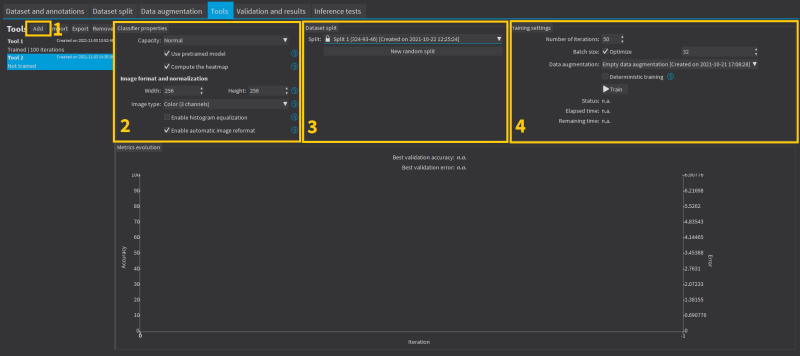
The training settings
|
●
|
The Number of iterations. An Iteration corresponds to going through all the images in the training set once. |
|
□
|
トレーニングプロセスは、良い結果を得るために多数のループを必要とします。 |
|
□
|
ループの数が多いほど、トレーニング時間は長くなり、得られる結果が向上します。 |
|
●
|
The Batch size corresponds to the number of image patches that are processed together. |
|
□
|
トレーニングはバッチのサイズの影響を受けます。 |
|
□
|
大きなバッチのサイズは、GPU上の1つのループの処理速度を向上させますが、より多くのメモリを必要とします。 |
|
□
|
トレーニングプロセスでは、小さすぎるバッチのサイズでは良いモデルを学習できません。 |
|
□
|
パフォーマンス上の理由から、バッチのサイズとして2のべき乗を選択するのが一般的です。 |
|
●
|
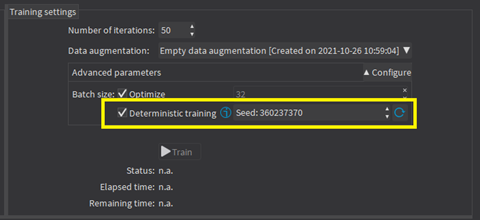
Whether to use Deterministic training or not. |
|
□
|
The deterministic training allows to reproduce the exact same results when all the settings are the same (tool settings, dataset split and training settings). |
|
□
|
The deterministic training fixes random seeds used in the training algorithm and uses deterministic algorithms. |
|
□
|
The deterministic training is usually slower than a non-deterministic training. |
|
□
|
In Deep Learning Studio, the option to use deterministic training and the random seed are available in the advanced parameters. |
Continue the training
You can continue to train a tool that is already trained.
In Deep Learning Studio, the dataset split associated with a trained tool is locked.
|
□
|
You can only continue training a tool with the same dataset split. |
|
□
|
You can still add new training or validation images to the split by moving test images to the training set or the validation set of that split. |
Asynchronous training
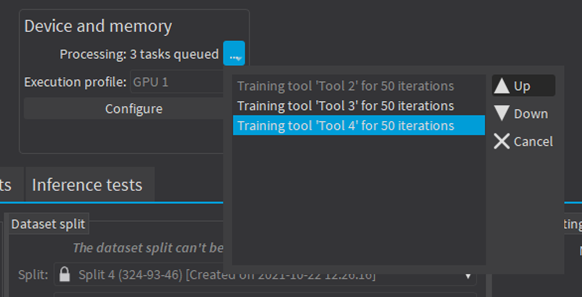
The training process is asynchronous and performed in the background.
|
●
|
In Deep Learning Studio: |
|
□
|
The training processes are queued. |
|
□
|
They are automatically executed one after the other. |
|
□
|
You can manually reorder the training in the processing queue. |
|
□
|
トレーニング中に、はトレーニングの進捗を示します。 |