


Operation
The Camera Link® Validation Tool (CLVT) can be used to validate the operational parameters of a Camera Link® installation (clock frequency, cable type, cable length) resulting in reliable, long-term performance. CLVT does this by estimating, with a known confidence level, the probability of single bit errors in a Camera Link® setup.
We define:
| ● | PER: Probability of single bit error in a digital connection like Camera Link®; this is an unknown quantity that we want to estimate |
| ● | BER: Bit Error Rate, actually measured by the CLVT |
It is generally accepted that a Camera Link® data link will operate reliably, if PER < 10-12. This criterion is similar to the one used in other digital serial image transmission schemes. Of course, a better (lower) PER will provide even more assurance that the operation is reliable.
The CLVT computes the confidence level (CL), or likelihood, that the PER is less than a set of values (10-10, 10-11, 10-12, 10-13, 10-14), based on the measurement of the BER, during a time sufficiently long to accumulate the necessary evidence.
When started, the CLVT continually displays these confidence levels, as evidence accumulates with the passing of time, as illustrated below:
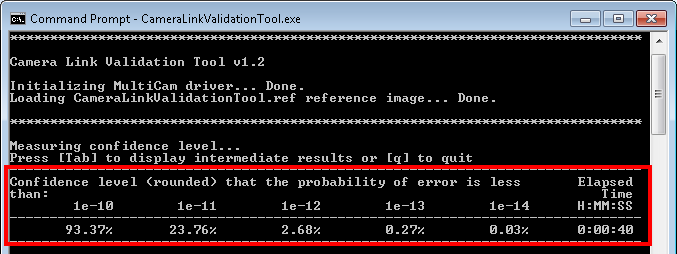
Camera Link® Validation Tool - screenshot #1
After 40 seconds, we have reached a 93.37 % confidence level that the PER is less than 10-10. The PER might very well be much better than that, but at this stage we have insufficient evidence to conclude that this is the case. The CLVT must be continued.
By pressing the [Tab] key, during the operation of the CLVT, additional information can be displayed (highlighted in yellow below), after which the CLVT continues its normal operation, for as long as necessary, to achieve the required confidence level for a predetermined PER.
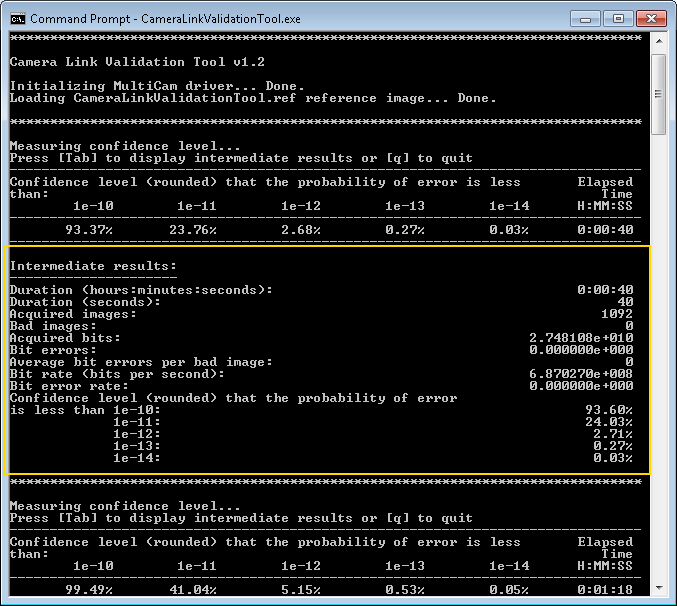
Camera Link® Validation Tool - screenshot #2
From this screenshot, we can already conclude that the confidence level that the PER is less than 10-11 has risen from 23.76 % to 41.04 %, after 78 seconds. The CLVT should be continued until the confidence level that the PER is less than 10-12 (at most – a stronger test would be a PER less than 10-13 ) has reached a satisfactory level (at least 95 %, and 99 % for a stronger result). This may require quite some time, because these outcomes require a significant amount of evidence.
Pressing the [q] key terminates the operation of the CLVT. The final results are displayed
(highlighted in green below) and a report file is saved in the <CLVT user folder>/reports/ folder.
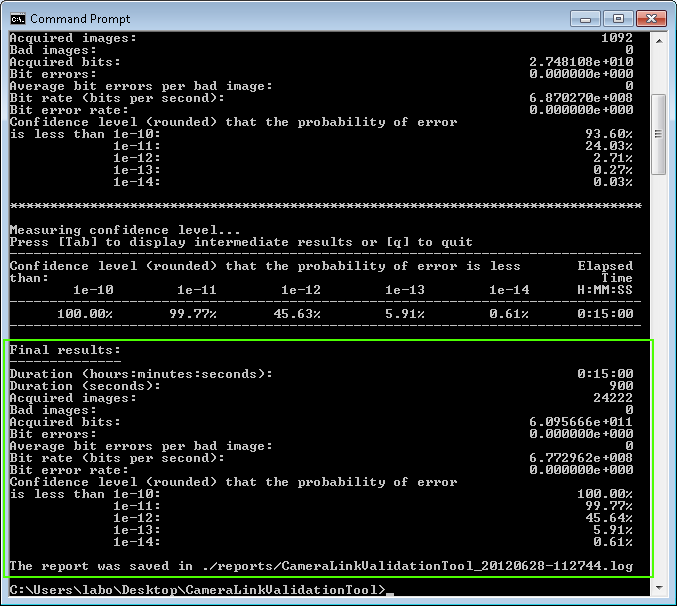
Camera Link® Validation Tool - screenshot #3