Classifying New Images
|
●
|
In Deep Learning Studio: |
|
□
|
Add new images to the dataset and refresh the results. |

|
□
|
Open the Inference tests tab to classify the new images and display the detailed results for these images. |
|
□
|
You can also export the results to CSV or export the heatmap from this tab. |
|
□
|
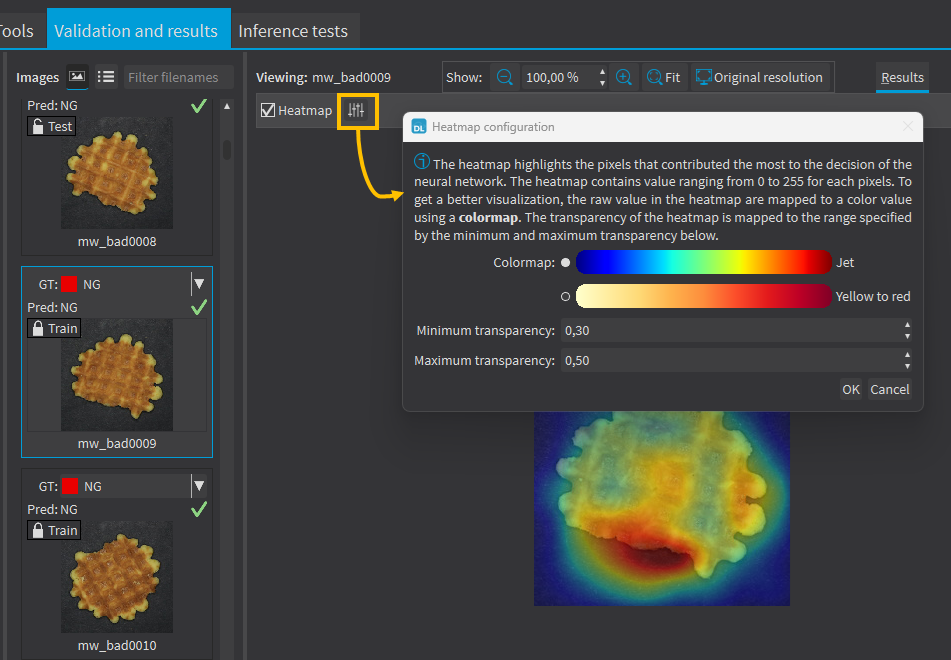
In the image viewer, you can enable or disable the heatmap visualization and configure how the heatmap is displayed (color map and transparency). |
|
●
|
You can also do batch classification or directly classify a vector of Open eVision images: |
|
□
|
Images are processed together in groups determined by the batch size. |
|
□
|
On a GPU, it is usually much faster to classify a group of images than a single image. |
|
□
|
On a CPU, implement a multithread approach to accelerate the classification. In that case, each thread must have its own instance of EClassifier (see code snippets). |
The batch classification has a tradeoff between the throughput (the number of images classified per second) and the latency (the time needed to obtain the result of an image): on a GPU, the higher the batch size, the higher the throughput and the latency. So, use batch classification to improve the classification speed at the cost of a longer time before obtaining the classification result of an image.
|
□
|
In some cases, this heatmap can provide a rough localization of the object corresponding to the label. |
|
□
|
The heatmap is colored, and the important parts are displayed in red. |
Since large memory allocations take a lot of time, a classification does not release its memory and the next classifications can reuse it as long as the width, height, batch size and computation device remain the same. As such, the first classification is always slower due to the memory allocations.